Server - How to Execute RSAT snapins with different users without server/client logon necessity

If you need to launch some mmc snapins with different AD account (without logging on server/pc with that credentials) you could follow these steps:


  1. Execute command prompt start --> cmd.exe
  2. Copy and paste this command text:
    C:\Windows\System32\runas.exe /netonly /user:aduser@domain.suffix "mmc %SystemRoot%\system32\xxxx_command.msc
  3. where command.msc is any command with .msc.
    Usually any .msc command that is included in your RSAT tool (win 7, Win 10)  installed on your pc 

You can review these blog articles too:


Scripting - Tutti i comandi .cpl, .msc ed altri dal menu start --> Esegui


2012 Server – RSAT anche in 2008 R2 SP1 e 2008 SP2


Scripting - Lista di comandi di start --> Esegui di Microsoft Windows

Scripting - Silent install SQL Studio Management Console Studio 17.2

If you need to silent install SQL Studio Management Console Studio 17.2 you can do that through command line and using properly command switches.

I took note on this quickly post about this settings for future purposes.


Install Program – “SSMS-Setup-ENU.exe” /install /quiet /norestart

Uninstall Program – “%programfiles(x86)%\Microsoft SQL Server\140\tools\binn\managementstudio\ssms.exe” /uninstall /quiet

Download SQL Server Management Studio (SSMS)

https://docs.microsoft.com/en-us/sql/ssms/download-sql-server-management-studio-ssms

direct Links:

2016 Server - Windows Server 2016 Security Guide free download

Today I would like to share information that Windows Server 2016 Security Guide can be downloaded for Free from Miscrosoft web site:

http://download.microsoft.com/download/6/7/3/673E651E-C5B3-4C93-A69A-94042EB6DE22/Windows_Server_2016_Security_Better_protection_begins_at_the_OS_Whitepaper_EN_US.pdf

Precedent .pdf ncludes general guidance for helping secure servers in your environment and how you can utilize new security features in Windows Server 2016.

About other windows 2016 articles you can review this link:

http://www.alessandromazzanti.com/search/label/Windows%202016%20Server

SCCM - How to disable local Administrator Account

If you need to disable local Administrator account, change/set password or create new local Admin/user you can review previously article about GPO approach.

GPO - How to create local Administrator account using Group policies
http://www.alessandromazzanti.com/2017/04/gpo-how-to-create-local-administrator.html

Otherwise you can do that using SCCM.

Summarizing you would need to create a simple CI checking on specific collection verifyng thereshold relatively devices that have local Administrator account enabled, apply remediation (account disabling) and finally have available reports/alerts.

Here it is more verbosely article:

https://4sysops.com/archives/disable-the-local-administrator-account-with-sccm/

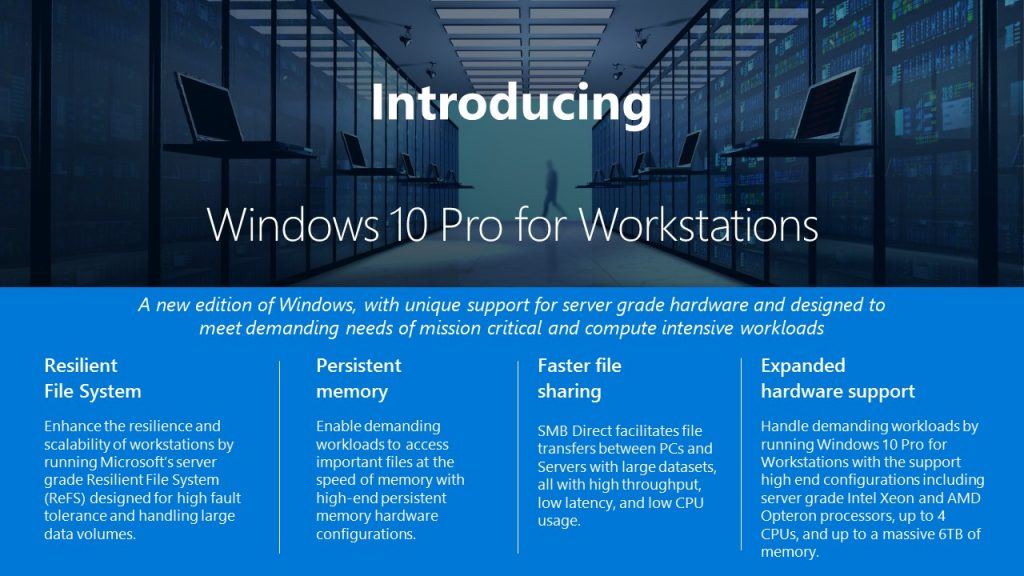
Windows 10 - Pro Workstation announcement about new release

Microsoft is going to release, during next months, following win 10 version:

https://blogs.windows.com/business/2017/08/10/microsoft-announces-windows-10-pro-workstations/

This announcement due to fact actually Windows 10 has this hardware limitation and often for particular activities on Workstation Microsoft server edition are installed as welle: 

  •  2 CPU, 256 cores and up to 2TB. RAM.
Windows 10 pro for Workstation is going to have these features:


  • ReFS (Resilient file system) support. (new Microsoft file system)
    ReFS provides cloud-grade resiliency for data on fault-tolerant storage spaces and manages very large volumes with ease. ReFS is designed to be resilient to data corruption, optimized for handling large data volumes, auto-correcting and more. It protects your data with integrity streams on your mirrored storage spaces. Using its integrity streams, ReFS detects when data becomes corrupt on one of the mirrored drives and uses a healthy copy of your data on the other drive to correct and protect your precious data.
  • Persistent memory support: 
    Windows 10 Pro for Workstations provides the most demanding apps and data with the performance they require with non-volatile memory modules (NVDIMM-N) hardware. NVDIMM-N enables you to read and write your files with the fastest speed possible, the speed of the computer’s main memory. Because NVDIMM-N is non-volatile memory, your files will still be there, even when you switch your workstation off.
  • SMB Direct support and lan card based on Remote Direct Memory Access (RDMA)
  • CPU Intel Xeon and AMD Opteron support till 4 CPU and  6 TB RAM.
Actually Windows 10 versions are going to become 12 (from 10):

  1. Windows 10 Home
  2. Windows 10 Pro
  3. Windows 10 Enterprise
  4. Windows 10 Education
  5. Windows 10 Pro Education
  6. Windows 10 Enterprise LTSB
  7. Windows 10 Mobile Enterprise
  8. Windows 10 Mobile
  9. Windows 10 IoT
  10. Windows 10 S
  11. Windows 10 Team
  12. Windows 10 Pro for Workstations

Here it is relative recap:

GPO - Wifi pcs and policy applying problems

Company laptop that connect to domain via WiFi could not apply correctly policies due to WiFi connection unavailability.

There are two alternatives to solve issue customizing properly GPO:

You can do this with Group Policy, using the Always wait for the network at computer startup and logon policy setting.  

https://technet.microsoft.com/en-us/library/gg486839.aspx

gplogon.jpg

Alternatively adding a delay during policy appling this policy:

Policy Location: Computer Configuration > Policies > Admin Templates > System > Group Policy
Setting Name: Startup policy processing wait time
Registry Key: HKLM\Software\Policies\Microsoft\Windows\System!GpNetworkStartTimeoutPolicyValue

https://support.microsoft.com/it-it/help/2421599/windows-7-clients-intermittently-fail-to-apply-group-policy-at-startup