Freeware - Blue Screen View tool #Nirsoft
Security - RemotePotato0 0-Day vulnerability
There is 0-day a vulnerability that affect all Windows versions permitting to gain Domain Admin permissions.
This attack use NTLM (old authentication protocol that was substituted by Kerberos), Microsoft suggest to disable NTLM (or configure servers to block NTLM relay). For the moment no patches are available (and it is not clear if Microsoft will never release it)
Meanwhile you can create 0patch account and install their patches.
Consider that O.S./SW no longer supported could benefits 0Patch platform patches/fixes
https://blog.0patch.com/2022/01/free-micropatches-for-remotepotato0.html
[original article]
Tutorial - How to download and convert Youtube Video with VLC
It's very fast and easy.
The original article, instead, it's at the following link:
http://download.html.it/articoli/scaricare-e-convertire-con-vlc-i-video-di-youtube-4/


Later the relative download will happen while you view the video going on the screen.
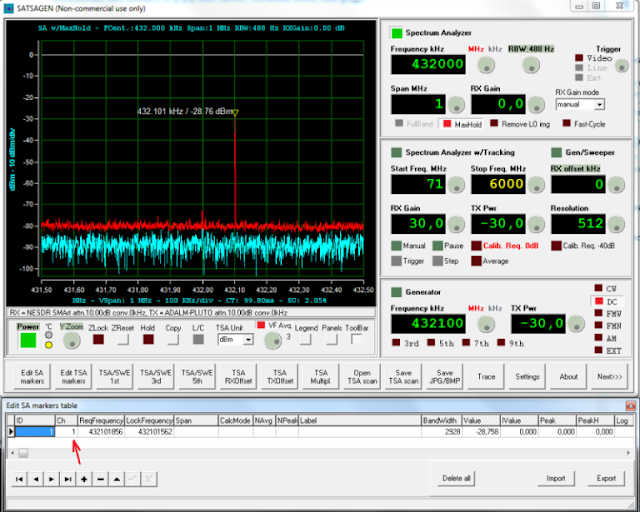
Website - Radio Frequence website and SATSAGEN Windows application that allows you to use an SDR device as a Spectrum Analyzer.
Today I would like to share this website mainly for radio-amateur
On website you can find SATSAGEN software mention. Consider that it is a Windows application that allows you to use an SDR device as a Spectrum Analyzer.
SATSAGEN is provided free of charge to the HAM Radio community, with the hope that SATSAGEN can be appreciated as a useful tool for our radio experimentation.
This is a latter post about SATSAGEN version 0.5.3.4
SATSAGEN news:
Download SATSAGEN from this link:
There is a latter interesting video that give you a software overview
Exchange - Recover Offline/dismounted/corrupted EDB files #HOW TO #Stellar Repair For Exchange
During previous years I worked hard on Exchange environment too.
Today I would like to mention Stellar Repair For Exchange
(Trial version here available https://cloud.stellarinfo.com/StellarRepairforExchange.exe)
Here they are products features highlights that I would like to share on this blog article:
- It supports Exchange Server 2019/2016/2013/2010/2007/2003/2000, and 5.5.
- Exports complete EDB file directly to live Exchange and Office 365.
- Recover Offline/dismounted/corrupted EDB files.
- Exchange Database Recovery
https://www.stellarinfo.com/support/kb/index.php/article/how-to-recover-corrupt-inaccessible-exchange-mailboxes - This tool is is the combination of five Exchange tools - Exchange Recovery, Mailbox Extractor, OST to PST Converter, Exchange Backup Extractor, and Password Recovery.
The 5-in-one Toolkit mounts and repairs the Exchange database and enables you to export mailboxes to PST, live Exchange, and Office 365.
https://www.stellarinfo.com/email-tools/exchange-toolkit.php - Selective Mailbox Recovery
- The Exchange database recovery software provides an enhanced preview of mailboxes and its items. The selective mailbox recovery feature allows users to repair the desired mailboxes or items and save them in multiple formats. The users can select or unselect individual or multiple mailboxes and mail items as per their recovery needs.
- Support Archive Mailboxes Recovery
- The Exchange recovery tool also supports archive mailbox recovery. The software can repair corrupt or damaged archive mailboxes and save them to PST, MSG, EML, RTF, HTML, or PDF format. You can also export the archive mailboxes to Office 365 or live Exchange server directly.
- Enhanced Mailbox Preview for Precise Recovery
- Exports Recovered Contacts to CSV
- Exports Recovered Files to Office 365
https://www.stellarinfo.com/support/kb/index.php/article/exchange-to-office-365-migration - Saves Recovered Exchange Mailboxes in Various Formats
https://www.stellarinfo.com/support/kb/index.php/article/save-mailboxes-msg-eml-html-rtf-pdf - Deleted Exchange Mailbox Recovery
https://www.stellarinfo.com/support/kb/index.php/article/recover-deleted-exchange-mailboxes
Scripting - Get-ADComputer - How to retrieve computer last logon date
There is an easy and quick way to get .TXT file with all AD computer names and relativse last logon dates.
- You must execute Powershell module with Administrative rights.
- Import-Module activedirectory
- Get-Help Get-ADComputer
- Get-ADComputer -Filter * -Properties * | Sort LastLogonDate | FT Name, LastLogonDate -Autosize | Out-File C:\Temp\ComputerLastLogonDate.txt
- $DaysInactive = 90
- $time = (Get-Date).Adddays(-($DaysInactive))
- Get-ADComputer -Filter {LastLogonTimeStamp -lt $time} -ResultPageSize 2000 -resultSetSize $null -Properties Name, OperatingSystem, SamAccountName, DistinguishedName
- Get-ADComputer -Filter {LastLogonTimeStamp -lt $time} -ResultPageSize 2000 -resultSetSize $null -Properties Name, OperatingSystem, SamAccountName, DistinguishedName | Export-CSV “C:\Temp\StaleComps.CSV” –NoTypeInformation