Freeware - Teracopy and RichCopy two GUI tools for coping files

I would like to highlight two software that should be allways in your IT tool collection.

Here they are characteristic and explanations.

TeraCopy 3.1

It is a compact program designed to copy and move files at the maximum possible speed, providing the user a lot of features:

  • It uses dynamically adjusted buffers to reduce seek times. Asynchronous copy speeds up file transfer between two physical hard drives.
  • Pause and resume file transfers. 
  • Error recovery. In case of copy error, it will try several times and in the worse case just skips the file, not terminating the entire transfer.
  • Interactive file list. It shows failed file transfers and lets you fix the problem and recopy only problem files.
  • Shell integration. TeraCopy can completely replace Explorer copy and move functions, allowing you work with files as usual.
  • Full Unicode support.

Spotlight RichCopy


offers a number of granular controls that allow you to tailor file copying to your needs


Freeware - UninstallView from NirSoft

Today I would like to highlight UninstallView is a new tool for Windows that collects information about all programs installed on your system and displays the details of the installed programs in one table. 
You can use it to get installed programs information for your local system, for remote computer on your network, and for external hard-drive plugged to your computer. It also allows you to easily uninstall a software on your local computer and remote computer (Including quiet uninstall if the installer supports it).

Disaster Recovery - Ex-Admin Deletes All Customer Data and Wipes Servers of Dutch Hosting Provider

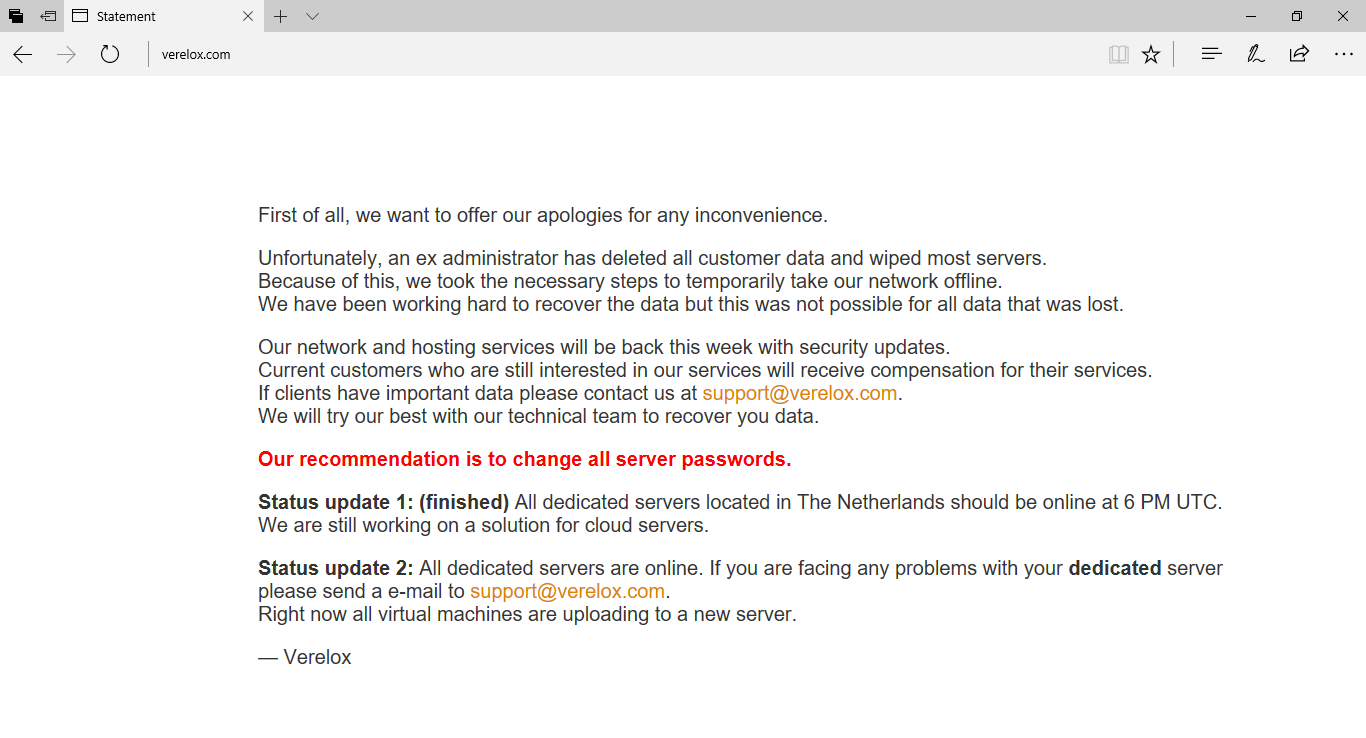
Today I would like to mention this incredible history about an ex-Administrator proceeded to delete and wipe all customers servers.

You can review following image that well explain what happened:

Verelox, a provider of dedicated KVM and VPS servers based in The Hague, Netherlands, suffered a catastrophic outage after a former administrator deleted all customer data and wiped most of the company's servers.


more details can be found here:

https://www.bleepingcomputer.com/news/security/ex-admin-deletes-all-customer-data-and-wipes-servers-of-dutch-hosting-provider/

Windows 10 - How to: Move from BIOS to UEFI with the new Windows 10 Creators Update

Microsoft Mechanics delivers a comprehensive yet concise explanation of how you can safely and non-destructively convert a Windows 10 machine from legacy BIOS to UEFI disk partitioning.

Windows Program Manager, Desmond Lee, demonstrates the new MBR2GPT disk conversion tool that’s part of Windows 10 Creators Update. 
This is a comprehensive yet concise overview that explains how you can safely and non-destructively convert a Windows 10 machine from legacy BIOS to UEFI disk partitioning; and how you can automate the conversion as part of your in-place upgrade process from Windows 7 to Windows 10. 

Importantly, unlike wipe and load methods, all of this can be achieved without having to move your data off the disk.
To learn more please also check out: http://aka.ms/mbr2gpt


Scripting - Nslookup and debugging mode

About Nslookup command you can review old blog articles.

Nslookup

I would like to highlight this interesting Microsoft article and debug switch to have more debug capability when nslookup is launched and there are some unknown DNS query problems.

Scripting - Il comando NSLOOKUP parte 2 (piu' DIG)

Scripting - comando nslookup

Server - How to verify that your mail server work properly

<-------->


Nslookup's debug mode is a useful troubleshooting feature; you can set the local computer into this mode by typing set debug , or for even greater detail, set d2 . In debug mode, Nslookup lists the steps being taken to complete its commands, as shown in this example:

C:\>nslookup
(null) testpc1.reskit.com
Address: 172.16.8.190
> set d2
> rain-city
(null) testpc1.reskit.com
Address: 172.16.8.190
------------
SendRequest(), len 49
HEADER:
opcode = QUERY, id = 2, rcode = NOERROR
header flags: query, want recursion
questions = 1, answers = 0, authority records = 0, additional = 0
QUESTIONS:
rain-city.reskit.com, type = A, class = IN
------------
------------
Got answer (108 bytes):
HEADER:
opcode = QUERY, id = 2, rcode = NOERROR
header flags: response, auth. answer, want recursion, recursion avail.
questions = 1, answers = 2, authority records = 0, additional = 0
QUESTIONS:
rain-city.reskit.com, type = A, class = IN
ANSWERS:
-> rain-city.reskit.com
type = CNAME, class = IN, dlen = 31
canonical name = seattle.reskit.com
ttl = 86400 (1 day)
-> seattle.reskit.com
type = A, class = IN, dlen = 4
internet address = 172.16.2.3
ttl = 86400 (1 day)
------------
(null) seattle.reskit.com
Address: 172.16.2.3
Aliases: rain-city.reskit.com

SCOM - Backup - Veeam Management Pack for System Center v8

Today I would like to mention this Veeam Management Pack for System Center v8 that provides complete app-to-metal visibility for both your virtual and physical environments, creating the “big-picture” view of your entire virtualized infrastructure – and all from within the native System Center Management console.
This kind of monitor will include insights into Veeam Backup & Replication services.

https://www.veeam.com/system-center-management-pack-vmware-hyperv.html

What’s New in v8 Product Overview Editions Comparison Microsoft Solution Brief Veeam MP Differentiators