Ireland Datacenter expansions problems due to climate changes and power consumption, here it is an interesting italian article that well explain Ireland problems faced (but these problems should impact any other country as well)
Showing posts with label Cloud. Show all posts
Showing posts with label Cloud. Show all posts
Office 365 - TLS 1.0 and 1.1 no longer supported from 2021, 11Th January #Windows 7 #Outlook 2010 #Windows 2008 R2 server
Microsoft announced (MC229914) that TLS 1.0 and 1.1 will no longer be supported, from Exchange Online beginning January 11th 2021.
This change will impact endpoints too.
Final Notice for disabling of TLS1.0 and TLS 1.1 Support for Exchange Online Mail Flow
We will no longer support TLS 1.0 and TLS 1.1 from Exchange Online mail flow endpoints beginning January 11th 2021. As those versions of TLS are already retired (most recently communicated in MC218794, July '20), Exchange Online customers and their partners should already be using TLS1.2 to protect SMTP connections between their email servers or devices and Exchange Online.
https://admin.microsoft.com/AdminPortal/Home?ref=MessageCenter&id=MC229914
Client side you should verify that devices are connecting to Exchange Online using TLS 1.2
About Outlook 2010/Windows 7/Windows 2008 R2 be aware that TLS 1.2 is not enabled by default, these are register modifies that you should apply ( to override problem)
Update to enable TLS 1.1 and TLS 1.2 as default secure protocols in WinHTTP in Windows
More details can be found at below blog article:
Security - TLS 1.0 & 1.1 End of Life/support for several products
https://www.alessandromazzanti.com/2020/03/security-tls-10-11-end-of-lifesupport.html
BTW be aware about this other deadline (2021, 1th November):
Effective November 1, 2021, the following versions of Outlook for Windows, as part of Office and Microsoft 365 Apps, will not be able to connect with Office 365 and Microsoft 365 services.

[Other related articles]
https://jaapwesselius.com/2018/09/23/outlook-2010-disconnected-with-tls-1-2/
https://docs.microsoft.com/en-us/dotnet/framework/network-programming/tls#security-updates
[update 2025.08.20]
Windows Registry Editor Version 5.00
[HKEY_LOCAL_MACHINE\SOFTWARE\WOW6432Node\Microsoft\.NETFramework\v2.0.50727]
"SystemDefaultTlsVersions"=dword:00000001
"SchUseStrongCrypto"=dword:00000001
[HKEY_LOCAL_MACHINE\SOFTWARE\WOW6432Node\Microsoft\.NETFramework\v4.0.30319]
"SystemDefaultTlsVersions"=dword:00000001
"SchUseStrongCrypto"=dword:00000001
[HKEY_LOCAL_MACHINE\SOFTWARE\Microsoft\.NETFramework\v2.0.50727]
"SystemDefaultTlsVersions"=dword:00000001
"SchUseStrongCrypto"=dword:00000001
[HKEY_LOCAL_MACHINE\SOFTWARE\Microsoft\.NETFramework\v4.0.30319]
"SystemDefaultTlsVersions"=dword:00000001
"SchUseStrongCrypto"=dword:00000001


Cloud - Microsoft Tutorial
Today I would like to share this Microsoft Training that explain cloud concepts and principles:
https://docs.microsoft.com/en-us/learn/modules/principles-cloud-computing/
https://docs.microsoft.com/en-us/learn/modules/principles-cloud-computing/
Windows 10 - Version 20H2 & Windows Update for Business
Here it is a direct link about new features available on Windows 10 Version 20H2,
I would like to mention an alternative patch management tool to Windows Server Update Services (WSUS) named Windows Update for Business:
- https://docs.microsoft.com/en-us/windows/deployment/update/waas-manage-updates-wufb
- https://techcommunity.microsoft.com/t5/windows-blog-archive/what-is-windows-update-for-business/ba-p/167033
- https://techcommunity.microsoft.com/t5/configuration-manager-blog/third-party-updates-and-windows-update-for-business/ba-p/1660970
Freeware - Micrsoft Visio Alternative for free
Microsoft Visio is an excellent tool but is quite expensive.
Indeed is free and can work both online and as local installed software.
I hope that this information could be useful for someone:
https://www.draw.io
Indeed is free and can work both online and as local installed software.
I hope that this information could be useful for someone:
https://www.draw.io
Azure - Microsoft Azure Data Box about offline backups
I am taking note about Azure Data Box to Azure Backup that is used for offline initial backup of large datasets using Azure Data Box.
Here it is relative article that explain more verbosely concepts.
https://azure.microsoft.com/en-us/blog/azure-offline-backup-with-azure-data-box-now-in-preview/
And here it is an image on how it works:

Here it is relative article that explain more verbosely concepts.
https://azure.microsoft.com/en-us/blog/azure-offline-backup-with-azure-data-box-now-in-preview/
And here it is an image on how it works:

Backup - Veeam Agent for Microsoft Windows/Linux 3.0
Veeam - Veeam Endpoint Backup Free - Free version released
Backup - Veeam Backup for free v.2.0 for Client/Laptop
It is a very interesting backup software that permit to schedule bare metal backups for physical clients and Servers.
Backups can be done to external Hard Drives, NAS, shares, cloud or to Veeam B&R repositories.
There are 3 versions (Windows Product Edition Comparison - Linux Product Edition Comparison):
- Free. (no VSS, limitations about scheduling &Targets repositories, retention, Veeam B&R integration and technical support)
- Workstation. (no VSS, limitations about scheduling, retention, B&R integration)
- Server: that permit centralized Endpoint backup managements from Veeam B&R console (excellent feature)
Here it is Veeam Agent for Microsoft Windows 3.0 home page , Veeam Agent for Microsoft Windows 3.0 help center and all related guides/pdf.
Here they are some applicative aspects with relative hyperlinks:
- Backup & Restore features.
- Bare-metal restore & Bootable recovery media creation.
- Backups with passwords.
- Additional features:
- Password Reset about built-in Administrator account.
- Startup repair.
- Memory diagnostics.
- Transaction log backup for databases.
- Full support for Microsoft Windows Server 2019 and Microsoft Windows 10.
- Instant recovery to Microsoft Hyper-V VM.
- Back up directly to Veeam Cloud Connect.
- Veeam Restore to Microsoft Azure.
- https://helpcenter.veeam.com/docs/agentforwindows/userguide/vaw_automate.html?ver=30
- Source-side encryption.
- Email notifications.
- Centralized Endpoint backup managements from Veeam B&R console with Veeam B&R Server License.
- Restricting Network Connections Usage
- Endpoint protection for mobile users: Back up to a local cache when the target is not available and sync with your cached backups once the connection has been re-established, for this point here it is an interesting screenshot:

TIPS - rotated drives with Veeam Agent Windows - Free mode
Latter part of this article is dedicated to feature that is available with free edition:Backup on rotated drives is performed in the following way:
1. Veeam Agent for Microsoft Windows creates a backup chain on an external drive that you use as a backup target. The backup chain consists of the first full backup and a set of subsequent incremental backups.
2. When you swap drives and attach a new external drive, Veeam Agent for Microsoft Windows creates a separate backup chain on the new drive.
3. After you swap drives again, Veeam Agent for Microsoft Windows detects if there is a backup chain on the currently attached drive. If the backup chain exists, Veeam Agent for Microsoft Windows continues the existing chain: it creates a new incremental backup file and adds it to the existing backup files."
Here it is Veeam article and few screenshots for configuration:


[APPENDIX]
Here it is an interesting Veeam Article that explains differences between Synthetic vs Full backup
https://helpcenter.veeam.com/archive/backup/95/vsphere/synthetic_full_backup.html
"In free mode you can create only a single scheduling but you can use rotated drives as a target location for backups. This scenario can be helpful if you want to store backups on several external hard drives (for example, USB or FireWire) and plan to swap these drives between different locations regularly.
Azure - Windows 10 Enterprise for Virtual Desktops & Azure
Today I would like to share some information about Virtual Desktop feature provided by Microsoft through Azure.
For the moment I did not have time to better eviscerate this environment but it is an interesting alternative to VDI managed through RDS Microsoft feature or Citrix as well.
Windows Virtual Desktop Essentials | Intro and full tour
https://docs.microsoft.com/en-us/azure/virtual-desktop/overview
With Windows 10 Enterprise 1809 (2018 November update) release (*) there is an installation way that permit to use same O.S. from more user connected via RDP protocol.
(*) Properly licences are required:
About more details:
https://www.microsoft.com/en-us/microsoft-365/blog/2019/03/21/windows-virtual-desktop-public-preview/
https://www.nicolaferrini.it/ita/blog/1268-windows-10-enterprise-per-virtual-desktops.html
Here it is an old blog post related Windows 10 keyboard shortcut to switch between virtual desktops:
Tips - Win 10 e virtual desktop
For the moment I did not have time to better eviscerate this environment but it is an interesting alternative to VDI managed through RDS Microsoft feature or Citrix as well.
Windows Virtual Desktop Essentials | Intro and full tour
https://docs.microsoft.com/en-us/azure/virtual-desktop/overview
With Windows 10 Enterprise 1809 (2018 November update) release (*) there is an installation way that permit to use same O.S. from more user connected via RDP protocol.
(*) Properly licences are required:
About more details:
https://www.microsoft.com/en-us/microsoft-365/blog/2019/03/21/windows-virtual-desktop-public-preview/
https://www.nicolaferrini.it/ita/blog/1268-windows-10-enterprise-per-virtual-desktops.html
<==============>
Here it is an old blog post related Windows 10 keyboard shortcut to switch between virtual desktops:
Tips - Win 10 e virtual desktop
Manual - Cloud Migration Essentials: A guide to migrating servers and virtual machines
Today I would like to indicate this free Microsoft e-book that guid you on migration processess and actions to move VM to cloud:
https://azure.microsoft.com/en-us/resources/cloud-migration-essentials-e-book/en-us/?MC=OnPremInf&MC=DataMgmt&MC=MSAzure

https://azure.microsoft.com/en-us/resources/cloud-migration-essentials-e-book/en-us/?MC=OnPremInf&MC=DataMgmt&MC=MSAzure

Here they are major topics that you would read/get confidence on:
- Approach your cloud migration.
- Discover and assess your servers, virtual machines, and applications.
- Confidently execute your migration.
- Optimize and adjust your cloud services and resources.
Manual - Azure Strategy and Implementation Guide download for Free
I would like to mention that Microsoft give you capability to download for free below Manual.
 This e-book well apply for those who are new to Azure or in the beginning stages of planning a cloud migration: the Azure.
Download link
Here they are chapter names as well:
Chapter 1: Governance
Chapter 2: Architecture
Chapter 3: Application development and operations
Chapter 4: Service management

Download link
Here they are chapter names as well:
Chapter 1: Governance
Chapter 2: Architecture
Chapter 3: Application development and operations
Chapter 4: Service management
Security - Cloud Hacker considerations
I would like to focalize on Trojan aspect applied to Cloud services and relative user accounts.
Trojan could be easily installed on any pc/devices (For example visiting an unknown hackered website)
The concept it is simple: If you have a Trojan that intercept your Cloud user credential you are going to be in a very critical situation. (risk would increase if double authentication would not active on your cloud account)
Credentials could be used to stole your critical data/access to your company servers and be sold from criminals.
A very useful mitigation actions could be start using next generation antivirus providers that utilizes machine learning indeed than standard AV (this method use signatures as the primary detection mechanism)
Full interview and details could be found reading this article:
https://www.techrepublic.com/article/how-trojans-steal-credentials-and-attack-cloud-services/

If you are interested you could review these old blog articles/sections:
Cloud
http://www.alessandromazzanti.com/search/label/Cloud
Microsoft Azure
http://www.alessandromazzanti.com/search/label/Windows%20Azure
[update 2018.06.17]
I would like to indicate this Micorosft security video/lessons:
https://mva.microsoft.com/en-US/training-courses/hybrid-cloud-workload-protection-with-azure-security-center-18173?l=Ld0LK42jE_006218965
Trojan could be easily installed on any pc/devices (For example visiting an unknown hackered website)
The concept it is simple: If you have a Trojan that intercept your Cloud user credential you are going to be in a very critical situation. (risk would increase if double authentication would not active on your cloud account)
Credentials could be used to stole your critical data/access to your company servers and be sold from criminals.
A very useful mitigation actions could be start using next generation antivirus providers that utilizes machine learning indeed than standard AV (this method use signatures as the primary detection mechanism)
Full interview and details could be found reading this article:
https://www.techrepublic.com/article/how-trojans-steal-credentials-and-attack-cloud-services/

If you are interested you could review these old blog articles/sections:
Cloud
http://www.alessandromazzanti.com/search/label/Cloud
Microsoft Azure
http://www.alessandromazzanti.com/search/label/Windows%20Azure
[update 2018.06.17]
I would like to indicate this Micorosft security video/lessons:
https://mva.microsoft.com/en-US/training-courses/hybrid-cloud-workload-protection-with-azure-security-center-18173?l=Ld0LK42jE_006218965
Azure - How to move VM from Vmware to Azure
Today I would like to mentio this Microsoft tutorial that quickly explain if and yow to migrate VMs from Vmware to Azure
Virtual machine migration to Azure: Step-by-step guide for migrating from VMware to Azure
Virtual machine migration to Azure: Step-by-step guide for migrating from VMware to Azure
Jeff Woolsey, principal program manager from the Windows Server team, explains and demos the steps to discover, assess and migrate Windows and Linux virtual machines from VMware to Azure. The new Azure Migrate service helps you find on-premises VMs and apps using a collector
Azure - How to install Azure Powershell modules on Windows/Linux/macOS
I would like to mention this Microsoft article that easily explain how to install Azure Powershell module on Windows/Linux/MacOS.
Here it is step by step Microsoft article
Install and configure Azure PowerShell
If you want to take confidence with Azure powershell here it is an introduction web guide:
Getting started with Azure PowerShell
With Azure powershell you can easily create Lan Settings, virtual Machines and relative resources, define users, Firewall rules....
Be aware that Azure powershell could be used on web browser too (Cloud Shell)

Here it is step by step Microsoft article
Install and configure Azure PowerShell
If you want to take confidence with Azure powershell here it is an introduction web guide:
Getting started with Azure PowerShell
With Azure powershell you can easily create Lan Settings, virtual Machines and relative resources, define users, Firewall rules....
Be aware that Azure powershell could be used on web browser too (Cloud Shell)

Cloud - Azure Exam 70-533 and 30 days trial link
Considering that companies are moving slightly to hybrid cloud I would like to mention this Microsoft that permit to gain following certification:
https://www.microsoft.com/en-us/learning/exam-70-533.aspx
At precedent link several resources link and exam information are available.
About precedent exam it would be useful evaluate Azure 30 Days trial period account creation.
https://azure.microsoft.com/en-us/offers/ms-azr-0044p/
We offer eligible customers $200 in Azure credits (“Credits”) to be used within the first 30 days of sign-up and 12 months of select free services (services subject to change)
Here they are some old blog articles related to cloud:
Microsoft - Azure and Veeam Connect
HyperV 2012 - Free Download Ebook
[update 2018.06.17]
Here it is link to have a new free trial 30 days account on Azure:
https://azure.microsoft.com/en-us/free/?CR_CC=200246113&WT.mc_id=A062BFFBA
https://www.microsoft.com/en-us/learning/exam-70-533.aspx
At precedent link several resources link and exam information are available.
About precedent exam it would be useful evaluate Azure 30 Days trial period account creation.
https://azure.microsoft.com/en-us/offers/ms-azr-0044p/
We offer eligible customers $200 in Azure credits (“Credits”) to be used within the first 30 days of sign-up and 12 months of select free services (services subject to change)
Here they are some old blog articles related to cloud:
Microsoft - Azure and Veeam Connect
HyperV 2012 - Free Download Ebook
[update 2018.06.17]
Here it is link to have a new free trial 30 days account on Azure:
https://azure.microsoft.com/en-us/free/?CR_CC=200246113&WT.mc_id=A062BFFBA
Backup - Veeam Direct Restore to Microsoft Azure
Here it is interesting Veeam article:
https://www.veeam.com/cloud-direct-restore-azure.html
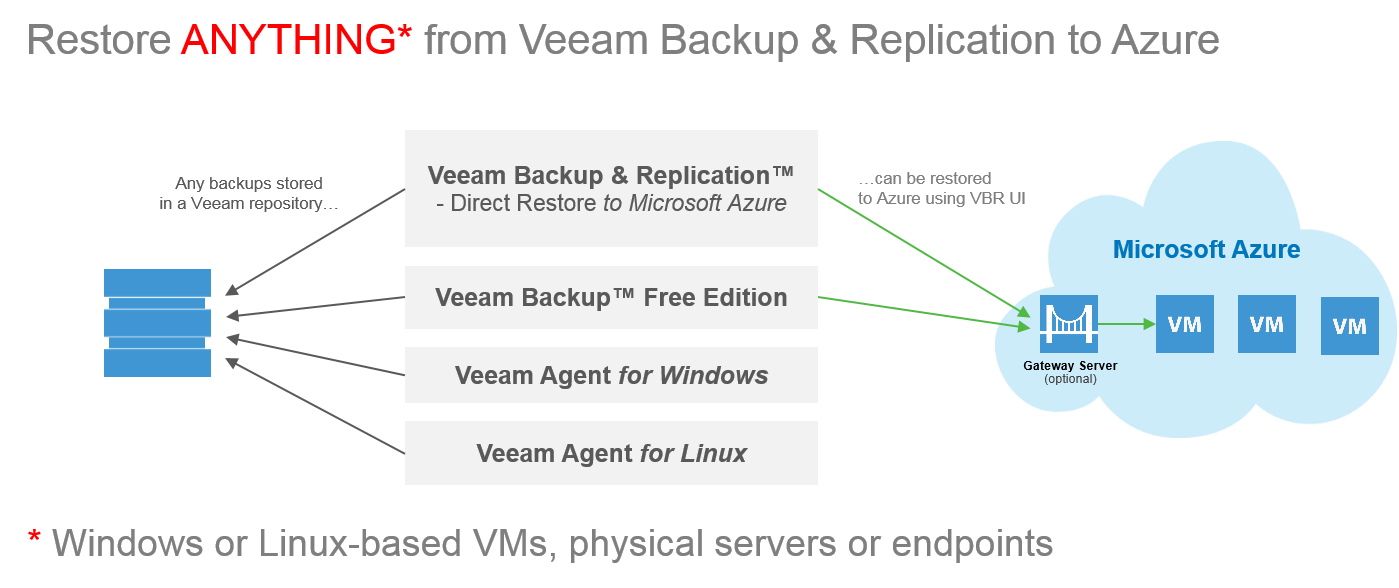
Direct Restore to Microsoft Azure, included in NEW Veeam Availability Suite 9.5, delivers cloud restore for Veeam backups to Microsoft Azure cloud. Veeam’s Direct Restore to Microsoft Azure enables admins to restore or migrate physical (P2V) or virtual (V2V) workloads to Azure
The Azure Virtual Machine Agent is installed automatically (on Windows-based VMs only), and sequential, parallel disk and VM-restore options are available.
Now se can easily execute planned workload migrations of VMware and Hyper-V VMs or remaining legacy physical servers to the cloud.
Azure can be very used as a test environment. Since it is created from your backups, it mirrors your production environment, and you can safely test patches and critical updates before rolling them out to production.
REMARK: Veeam recommends installation of a gateway server (optional), running on an Azure VM, for improved performance.
Meanwhile I would like to highlight this Veeam product too:
https://www.veeam.com/cloud-direct-restore-azure.html
Direct Restore to Microsoft Azure, included in NEW Veeam Availability Suite 9.5, delivers cloud restore for Veeam backups to Microsoft Azure cloud. Veeam’s Direct Restore to Microsoft Azure enables admins to restore or migrate physical (P2V) or virtual (V2V) workloads to Azure
The Azure Virtual Machine Agent is installed automatically (on Windows-based VMs only), and sequential, parallel disk and VM-restore options are available.
Now se can easily execute planned workload migrations of VMware and Hyper-V VMs or remaining legacy physical servers to the cloud.
Azure can be very used as a test environment. Since it is created from your backups, it mirrors your production environment, and you can safely test patches and critical updates before rolling them out to production.
REMARK: Veeam recommends installation of a gateway server (optional), running on an Azure VM, for improved performance.
Meanwhile I would like to highlight this Veeam product too:
Veeam FastSCP for Microsoft Azure
Veeam FastSCP™ for Microsoft Azure delivers easy-to-use, reliable and fast file copy for Azure VMs. This free standalone utility provides secure file copy over HTTPS with built-in encryption (no VPN needed), scheduled file copy jobs and a wizard-driven UI to transfer files in just a few clicks — with no scripting knowledge required.
Microsoft - Azure and Veeam Connect
Remote backup services is possible with integrated solutions Veeam and Microsoft.
Backup remote second copy is a best practice in the sector: to protect the data you must have a copy on a different site from the production.
You can do that through integration between Backup & Replication Veeam and Microsoft Azure.
Here is an interesting Webminar and a deeper article:
VCC for Service Providers
Azure e Veeam Cloud Connect Webminar
Backup remote second copy is a best practice in the sector: to protect the data you must have a copy on a different site from the production.
You can do that through integration between Backup & Replication Veeam and Microsoft Azure.
Here is an interesting Webminar and a deeper article:
VCC for Service Providers
Azure e Veeam Cloud Connect Webminar
Microsoft - Azure and Veeam Connect
Remote backup services is possible with integrated solutions Veeam and Microsoft.
Backup remote second copy is a best practice in the sector: to protect the data you must have a copy on a different site from the production.
You can do that through integration between Backup & Replication Veeam and Microsoft Azure.
Here is an interesting Webminar and a deeper article:
VCC for Service Providers
Azure e Veeam Cloud Connect Webminar
Backup remote second copy is a best practice in the sector: to protect the data you must have a copy on a different site from the production.
You can do that through integration between Backup & Replication Veeam and Microsoft Azure.
Here is an interesting Webminar and a deeper article:
VCC for Service Providers
Azure e Veeam Cloud Connect Webminar
Software - How to encrypt data before store them in the cloud

When you utilize any Cloud storage any data that you will have remotely
would not be encrypted.
So, to avoid any privacy problem, I would like to suggest utilizing BoxCryptor that
locally encrypt data before sending them to any cloud storage purchased.
https://www.boxcryptor.com/en/
https://www.boxcryptor.com/en/
Here they are some key features:
- Master Key: If enabled, the Master Key gives you the power to decrypt every file which is accessible by users of your company or organization - without having to know your users passwords. With this Master Key, you are protected against the loss of access to you property (your files) even in complicated situations (e.g. when a user forgets his password or leaves the company). Learn more
- Password Reset: Due to Boxcryptor's zero-knowledge nature, a user loses access to his files if the password is lost or forgotten. Without the password, it is not possible to decrypt the user's private key and thus it's not possible to decrypt the files. However, if a company has enabled the Master Key feature, the company can also use the password reset feature. The Master Key gives the administrator of the company the power to decrypt the private keys of all the users that belong to the company. Read more
- Active Directory Support: Sync your Boxcryptor users with the users in your directory and reduce management overhead.
- Policies: With this feature a company has the possibility to define its policies and comply with its security guidelines. These policies include the option to define a minimum password length, IP login restrictions, enforcing filename encryption, and more.
- Reduce HIPAA Liability: Boxcryptor allows you to track your users activities, increase your data security and therefore helps you to be HIPAA compliant.
- Centralized Management and Invoicing: All the users and the settings defined by the company can be managed by your company's administrator in a centralized manner.
OneDrive it might be a good cloud storage choice.
https://onedrive.live.com/
https://onedrive.live.com/
https://onedrive.live.com/
https://onedrive.live.com/
Office 2013 - Gratis on the Cloud
Microsoft ha dato la possibilita' a tutti gli utenti di utilizzare Office 2013 in versione cloud gratuitamente.
Tutti i documenti vengono creati e modificati in OneDrive il cloud di Microsoft con 7GB di spazio gratuito (se vuoi dello spazio gratuito extra iscriviti cliccando qui), integrato direttamente in Windows 8.
Per maggiori info visionare il post del blog:
http://www.alessandromazzanti.com/2014/03/onedrive-porta-un-amico-in-onedrive-di.html
Microsoft has given the opportunity 'to all users to use Office 2013 version in the cloud for free.
All documents are created and edited in the Microsoft cloud OneDrive with 7GB of free space (additional free space if you want to subscribe by clicking here), built right into Windows 8.
Office 2013 Online: https://office.com/start/default.aspx
For more info see my blog post:
http://www.alessandromazzanti.com/2014/03/onedrive-porta-un-amico-in-onedrive-di.html
Tutti i documenti vengono creati e modificati in OneDrive il cloud di Microsoft con 7GB di spazio gratuito (se vuoi dello spazio gratuito extra iscriviti cliccando qui), integrato direttamente in Windows 8.
Office 2013 OnLine: https://office.com/start/default.aspx
Per maggiori info visionare il post del blog:
http://www.alessandromazzanti.com/2014/03/onedrive-porta-un-amico-in-onedrive-di.html
<------------->
All documents are created and edited in the Microsoft cloud OneDrive with 7GB of free space (additional free space if you want to subscribe by clicking here), built right into Windows 8.
Office 2013 Online: https://office.com/start/default.aspx
For more info see my blog post:
http://www.alessandromazzanti.com/2014/03/onedrive-porta-un-amico-in-onedrive-di.html
Azure - How to implement Backup Windows 2008/2012 Server Backup on Azure

With Azure you have the ability to backup your Server Data (using local agend and activating Azure backup Feature) so you would have backup available on remote site:
Here is the relative link:
http://backupsicurionline.it/
And the relative tutorial:
http://backupsicurionline.it/_guida/GuidaAzureFaiDaTe.pdf
Other links:
http://www.windowsazure.com/it-it/solutions/infrastructure/
http://msdn.microsoft.com/en-us/171fe77a-8686-4dd1-a45a-b44df729b
Subscribe to:
Posts (Atom)