Here it is relative link
Showing posts with label Programs. Show all posts
Showing posts with label Programs. Show all posts
Freeware - ebook Reader - Adobe Digital Editions
If you need to open ebook using computer, Apple and Android devices Adobe Digital Editions is freeware and it work fine.


Freeware - Micrsoft Visio Alternative for free
Microsoft Visio is an excellent tool but is quite expensive.
Indeed is free and can work both online and as local installed software.
I hope that this information could be useful for someone:
https://www.draw.io
Indeed is free and can work both online and as local installed software.
I hope that this information could be useful for someone:
https://www.draw.io
Security - Chrome automatically delete history Extention - History Cleaning
Internet is an important opportunity but it is surely used to collect data, track usage and advertise users based on their tastes, web sites visited and cookies as well.
Taking note about this considerations I was searching about automatically history deletion when chrome is going to be closed.
Unfortunately Chrome does not support this feature as officially indicated here.
https://support.google.com/chrome/thread/2125707?hl=en
Workaround is reached using History Cleaning Extension that permit to choose precisely what must be deleted at browser shutting down.
https://chrome.google.com/webstore/detail/history-eraser/gjieilkfnnjoihjjonajndjldjoagffm
https://www.hotcleaner.com/history-eraser-chrome-extension-app.html

Taking note about this considerations I was searching about automatically history deletion when chrome is going to be closed.
Unfortunately Chrome does not support this feature as officially indicated here.
https://support.google.com/chrome/thread/2125707?hl=en
Workaround is reached using History Cleaning Extension that permit to choose precisely what must be deleted at browser shutting down.
https://chrome.google.com/webstore/detail/history-eraser/gjieilkfnnjoihjjonajndjldjoagffm
https://www.hotcleaner.com/history-eraser-chrome-extension-app.html

Tips - Live Optics and Vmware 5.1.0 No SOAP response error
Live Optics permits collecting all Hypervisors and VM performance counters.
https://www.liveoptics.com/about-live-optics/
Live Optics (Dell EMC) is an industry standard method of impartially documenting server/storage configuration and performance as well as observing file characteristics of data.
This approach permits to analyse existing infrastructure and help decisions about upgrade or hardware renewal as well.
Consider that SAN Optics can be utilized to conduct health assessments on your Storage Area Networks.
Here it isproblem that we faced (and succesfully fixed):

https://www.liveoptics.com/about-live-optics/
Live Optics (Dell EMC) is an industry standard method of impartially documenting server/storage configuration and performance as well as observing file characteristics of data.
This approach permits to analyse existing infrastructure and help decisions about upgrade or hardware renewal as well.
Consider that SAN Optics can be utilized to conduct health assessments on your Storage Area Networks.
Here it isproblem that we faced (and succesfully fixed):
- We executed Live Optics software on a W2008 R2 Server related to a Vmware vCenter Server 5.1.0.
- Collecting was not working using administrator account as well.
- "LiveOptics_TroubleshootingTrace.txt" was showing these entries
2019-05-06Thh:mm:ss+02:00 SOAP Fault: ServerFaultCode:
2019-05-06Thh:mm:ss+02:00 Fault detail type:
ERROR: 2019-05-06Thh:mm:ss+02:00 No SOAP response!
- We opened a Live Optics ticket.
- Support confirmed us that problem was due to an error applicative side.
This problem was fixed yesterday with below ne version
Live Optics 2.5.20.468497

Azure - How to install Azure Powershell modules on Windows/Linux/macOS
I would like to mention this Microsoft article that easily explain how to install Azure Powershell module on Windows/Linux/MacOS.
Here it is step by step Microsoft article
Install and configure Azure PowerShell
If you want to take confidence with Azure powershell here it is an introduction web guide:
Getting started with Azure PowerShell
With Azure powershell you can easily create Lan Settings, virtual Machines and relative resources, define users, Firewall rules....
Be aware that Azure powershell could be used on web browser too (Cloud Shell)

Here it is step by step Microsoft article
Install and configure Azure PowerShell
If you want to take confidence with Azure powershell here it is an introduction web guide:
Getting started with Azure PowerShell
With Azure powershell you can easily create Lan Settings, virtual Machines and relative resources, define users, Firewall rules....
Be aware that Azure powershell could be used on web browser too (Cloud Shell)

Program - Brute Force Wordpress Plugin
About Wordpress I would like to mention this Wordpress plugin that work with .htaccess file.
Brute Force Login Protection can be found/downloaded here:
https://wordpress.org/plugins/brute-force-login-protection/
Here they are major features:
Brute Force Login Protection can be found/downloaded here:
https://wordpress.org/plugins/brute-force-login-protection/
Here they are major features:
- Limit the number of allowed login attempts using normal login form/Auth Cookies
- Manually block/unblock/(whitelist trusted) IP addresses
- Delay execution after a failed login attempt (to slow down brute force attack)
- Option to inform user about remaining attempts on login page
- Option to email administrator when an IP has been blocked
- Custom message to show to blocked users
about plugin installation it is decisevely straight:
1. Install the plugin either via the WordPress.org plugin directory, or by uploading the files to your wp-content/plugin directory.
2. Activate the plugin through the WordPress admin panel.
3. Customize the settings on the settings page.
Freeware - Teracopy and RichCopy two GUI tools for coping files
I would like to highlight two software that should be allways in your IT tool collection.
Here they are characteristic and explanations.

Here they are characteristic and explanations.
TeraCopy 3.1
It is a compact program designed to copy and move files at the maximum possible speed, providing the user a lot of features:- It uses dynamically adjusted buffers to reduce seek times. Asynchronous copy speeds up file transfer between two physical hard drives.
- Pause and resume file transfers.
- Error recovery. In case of copy error, it will try several times and in the worse case just skips the file, not terminating the entire transfer.
- Interactive file list. It shows failed file transfers and lets you fix the problem and recopy only problem files.
- Shell integration. TeraCopy can completely replace Explorer copy and move functions, allowing you work with files as usual.
- Full Unicode support.
Spotlight RichCopy
offers a number of granular controls that allow you to tailor file copying to your needs
Tips - Google Chrome redistributable download
If you need to download latest google chrome version in redistributable version and, in case, have portable with old google chrome executable too here is useful link for you:
http://www.geocities.jp/ecvcn/exam/chrome_installer.html
[update 2019.09.12]
If you want to install Chrome for your own user account:
http://www.geocities.jp/ecvcn/exam/chrome_installer.html
[update 2019.09.12]
If you want to install Chrome for your own user account:
If you want to install Chrome for all user accounts:
Nmap - Scanning port tool
Nmap ("Network Mapper") is a free and open source (license) utility for network discovery and security auditing.
Many systems and network administrators also find it useful for tasks such as network inventory, managing service upgrade schedules, and monitoring host or service uptime. Nmap uses raw IP packets in novel ways to determine what hosts are available on the network, what services (application name and version) those hosts are offering, what operating systems (and OS versions) they are running, what type of packet filters/firewalls are in use, and dozens of other characteristics.
It was designed to rapidly scan large networks, but works fine against single hosts. Nmap runs on all major computer operating systems, and official binary packages are available for Linux, Windows, and Mac OS X. In addition to the classic command-line Nmap executable, the Nmap suite includes an advanced GUI and results viewer (Zenmap), a flexible data transfer, redirection, and debugging tool (Ncat), a utility for comparing scan results (Ndiff), and a packet generation and response analysis tool (Nping).
Nmap was named “Security Product of the Year” by Linux Journal, Info World, LinuxQuestions.Org, and Codetalker Digest. It was even featured in twelve movies, including The Matrix Reloaded, Die Hard 4, Girl With the Dragon Tattoo, and The Bourne Ultimatum.
Nmap is ...
Effettuare un "port scan" completo è possibile su tutti i sistemi operativi, grazie a questo eccellente software open source.
Many systems and network administrators also find it useful for tasks such as network inventory, managing service upgrade schedules, and monitoring host or service uptime. Nmap uses raw IP packets in novel ways to determine what hosts are available on the network, what services (application name and version) those hosts are offering, what operating systems (and OS versions) they are running, what type of packet filters/firewalls are in use, and dozens of other characteristics.
It was designed to rapidly scan large networks, but works fine against single hosts. Nmap runs on all major computer operating systems, and official binary packages are available for Linux, Windows, and Mac OS X. In addition to the classic command-line Nmap executable, the Nmap suite includes an advanced GUI and results viewer (Zenmap), a flexible data transfer, redirection, and debugging tool (Ncat), a utility for comparing scan results (Ndiff), and a packet generation and response analysis tool (Nping).
Nmap was named “Security Product of the Year” by Linux Journal, Info World, LinuxQuestions.Org, and Codetalker Digest. It was even featured in twelve movies, including The Matrix Reloaded, Die Hard 4, Girl With the Dragon Tattoo, and The Bourne Ultimatum.
Nmap is ...
- Flexible: Supports dozens of advanced techniques for mapping out networks filled with IP filters, firewalls, routers, and other obstacles. This includes many port scanning mechanisms (both TCP & UDP), OS detection, version detection, ping sweeps, and more. See the documentation page.
- Powerful: Nmap has been used to scan huge networks of literally hundreds of thousands of machines.
- Portable: Most operating systems are supported, including Linux, Microsoft Windows, FreeBSD, OpenBSD, Solaris, IRIX, Mac OS X, HP-UX, NetBSD, Sun OS, Amiga, and more.
- Easy: While Nmap offers a rich set of advanced features for power users, you can start out as simply as "nmap -v -A targethost". Both traditional command line and graphical (GUI) versions are available to suit your preference. Binaries are available for those who do not wish to compile Nmap from source.
- Free: The primary goals of the Nmap Project is to help make the Internet a little more secure and to provide administrators/auditors/hackers with an advanced tool for exploring their networks. Nmap is available for free download, and also comes with full source code that you may modify and redistribute under the terms of the license.
- Well Documented: Significant effort has been put into comprehensive and up-to-date man pages, whitepapers, tutorials, and even a whole book! Find them in multiple languages here.
- Supported: While Nmap comes with no warranty, it is well supported by a vibrant community of developers and users. Most of this interaction occurs on the Nmap mailing lists. Most bug reports and questions should be sent to the nmap-dev list, but only after you read the guidelines. We recommend that all users subscribe to the low-traffic nmap-hackers announcement list. You can also find Nmap on Facebook andTwitter. For real-time chat, join the #nmap channel on Freenode or EFNet.
- Acclaimed: Nmap has won numerous awards, including "Information Security Product of the Year" by Linux Journal, Info World and Codetalker Digest. It has been featured in hundreds of magazine articles, several movies, dozens of books, and one comic book series. Visit the press page for further details.
- Popular: Thousands of people download Nmap every day, and it is included with many operating systems (Redhat Linux, Debian Linux, Gentoo, FreeBSD, OpenBSD, etc). It is among the top ten (out of 30,000) programs at the Freshmeat.Net repository. This is important because it lends Nmap its vibrant development and user support communities.
<-------------------->
Effettuare un "port scan" completo è possibile su tutti i sistemi operativi, grazie a questo eccellente software open source.

Il tool di riferimento per ogni amministratore di rete o power-user che si rispetti è indubbiamente Nmap! Si tratta di un potente port scanner, capace di analizzare computer sia in LAN, sia via Internet e preparare report completissimi circa le porte TCP o UDP raggiungibili.
È compatibile con Windows (comprese le compilazioni a 64 bit), Linux e Mac OS X e può essere utilizzato sia da riga di comando, sia tramite una comoda interfaccia grafica chiamata Zenmap, già inclusa nei pacchetti d'installazione per sistemi operativi Microsoft ed Apple.
Il software è distribuito con licenza open source. Questo significa che può essere utilizzato liberamente, anche per scopi professionali.
Il Download si può effettuare in http://nmap.org/
È compatibile con Windows (comprese le compilazioni a 64 bit), Linux e Mac OS X e può essere utilizzato sia da riga di comando, sia tramite una comoda interfaccia grafica chiamata Zenmap, già inclusa nei pacchetti d'installazione per sistemi operativi Microsoft ed Apple.
Il software è distribuito con licenza open source. Questo significa che può essere utilizzato liberamente, anche per scopi professionali.
Il Download si può effettuare in http://nmap.org/
Backup - Veeam Backup for free v.2.0 for Client/Laptop
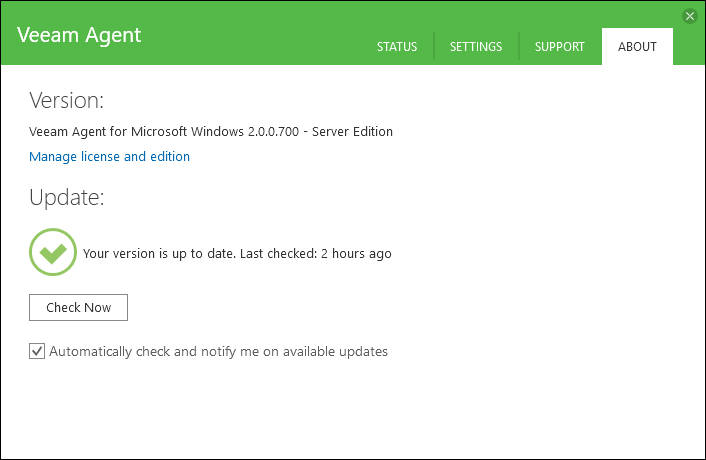
Veeam - 57 restore scenarioVeeam Agent for Windows easily back up PC to an external hard drive, NAS (network-attached storage) share or a Veeam Backup & Replicatio repository, here they are more details:
https://www.veeam.com/windows-endpoint-server-backup-free.html
Product Overview Free Product Overview Editions Comparison User Guide Veeam Agent Configurator | FAQ
Download Link
Windows servers and workstations can be saved in this way too:

Major v.2 features:
Bootable recovery media:

Integration with Veeam Backup & Replication

Here they are more Veeam blog articles:
Backup - Veeam free e-book: Conversational Ransomware Defense and Survival
Veeam - Incremental vs. differential methods compare
Veeam Explorer for Active Directory and Group policy Object Restore procedure
Microsoft - Azure and Veeam Connect
Veeam - Backing up Domain Controller: Best practices for AD protection (Part 1,2,3 and 4)
Monitoring - VirtualWin with Autoswitcher plugin
Server - how to expose QNAP iscsi storage to Vmware based system
[update 2019.05.13]
Here they are updated links to all QNAP Storage products:
https://www.qnap.com/it-it/product/
https://www.veeam.com/windows-endpoint-server-backup-free.html
Product Overview Free Product Overview Editions Comparison User Guide Veeam Agent Configurator | FAQ
Download Link
Windows servers and workstations can be saved in this way too:
Major v.2 features:
- Direct Restore to Microsoft Azure: Restore or migrate on-premises, Windows-based physical server and endpoint backups directly into Microsoft Azure
- Synthetic full backups: Eliminate the need for periodic full backups by creating forever-incremental backups that save time and storage
- Windows 10 & Windows 2016 Server full support
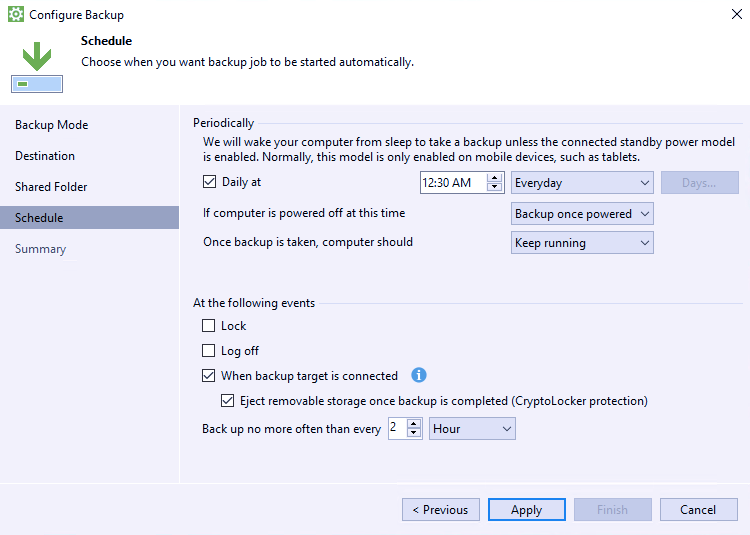
- CryptoLocker protection for USB Storage: Protect USB-based storage targets from potential CryptoLocker threats by automatically ejecting them after a successful job run
- Recovery options: Bare-metal restore: Restore your entire system to the same or different hardware
- Volume-level restore: Restore a failed hard drive or corrupted partition.
- File-level restore: Restore individual files from ANY backup type few minutes.
Bootable recovery media:
- Reset password: Reset the password for the built-in administrator account.
- Startup repair: Fix system problems that might prevent Windows from starting (e.g., missing or damaged system files, corrupted boot sector, etc.) Learn more
- Memory diagnostics: Check the system memory of your computer and detect potential problems after the next system reboot. Learn more
- Command prompt: Start the Microsoft Windows command prompt (cmd.exe)
Integration with Veeam Backup & Replication
- If you’re using Veeam Backup & Replication in your VMware vSphere or Microsoft Hyper-V virtual environment, you’ll be able to take full advantage of Veeam backup repositories as target locations for your Veeam Agent for Microsoft Windows jobs.
- In this way you could get endpoint backups off site to disk, tape or even the cloud with Backup Copy and Backup to Tape jobs
Here they are more Veeam blog articles:
Backup - Veeam free e-book: Conversational Ransomware Defense and Survival
Veeam - Incremental vs. differential methods compare
Veeam Explorer for Active Directory and Group policy Object Restore procedure
Microsoft - Azure and Veeam Connect
Veeam - Backing up Domain Controller: Best practices for AD protection (Part 1,2,3 and 4)
Monitoring - VirtualWin with Autoswitcher plugin
Server - how to expose QNAP iscsi storage to Vmware based system
[update 2019.05.13]
Here they are updated links to all QNAP Storage products:
https://www.qnap.com/it-it/product/
HyperV/Vmware - How to convert .VHD file to .VMDK
If you only have a VHD file, and you want to convert it to VMDK format, WinImage (now at 9.0 version) can come to rescue. WinImage is a shareware but available for free evaluation use for up to 30 days. WinImage, which available in both 32-bit (x86) and 64-bit (x64) versions, is available for download from

http://www.winimage.com/download.htm
The WinImage 8.50, 8.10, 8.00, 7.00 and 6.10 download contains the standard and professional editions of WinImage, as well as WinImage self-extractor.
I would like to highlight these old blog posts:
Vmware - Vmware Converter utility and consideration
HyperV - Microsoft Virtual Machine Converter 2.0
http://www.winimage.com/download.htm
The WinImage 8.50, 8.10, 8.00, 7.00 and 6.10 download contains the standard and professional editions of WinImage, as well as WinImage self-extractor.
I would like to highlight these old blog posts:
Vmware - Vmware Converter utility and consideration
HyperV - Microsoft Virtual Machine Converter 2.0
Tuning - Windows uninstalling clean up utility
I found an interesting utility that help to cleanup registry/windows settings after a software uninstallation that went not as expected.
Here it is relative link and explanations:
http://it.ccm.net/download/scaricare-434-windows-installer-cleanup-utility
Here it is relative link and explanations:
http://it.ccm.net/download/scaricare-434-windows-installer-cleanup-utility
Subscribe to:
Posts (Atom)