Showing posts with label Software. Show all posts

Tips #SwissTransfer an WeTransfer alternative

To share files you can use Swisstransfer that is decisevely a good WeTransfer alternative.

Here they are key points vs WeTransfer

https://www.swisstransfer.com/it

SwissTransfer provides a strong free alternative to WeTransfer for non-sensitive file sharing. The service is operated by Infomaniak, hosts files in Switzerland, supports encryption in transit and at rest, requires no registration, and allows transfers of up to 50 GB.

By comparison, WeTransfer Free is currently limited to 10 transfers or 3 GB in total over a rolling 30-day period.

For users who need to exchange large files without creating an account, SwissTransfer currently offers a clear advantage in the free tier. For confidential or corporate-sensitive information, however, an organization-approved file-sharing platform should still be preferred.


Software - FastStone Capture 10.0.4 screen/video capture and other similar softwares.

I would like to mention an excellent shareware software (that till 5.3 release version was free for personal use)
FastStone Capture has several features to acquire desktop screens and video as well (with high compression ratio)

Allows you to easily capture and annotate anything on the screen including windows, objects, menus, full screen, rectangular/freehand regions and even scrolling windows/web pages. It also allows you to record screen activities, sound and webcam into MP4 video files.

Here they are relative download links:

- Old versions: http://www.oldversion.com/windows/faststone-capture/
- Freeware 5.3 version: https://www.portablefreeware.com/?id=775
- Lastest versions: https://www.faststone.org/download.htm (20$ license price)


About similar softwares I would like to mention:
- PickPic https://picpick.app/
- ShareX which has powerfull settings and it is completely open-source
- LightBox that permit to easily copy and paste images https://lightboxsoftware.com/
- Greenshot that permit to modify and acquire screenshots, saving to folder, in jpg format. Be aware that all steps are automatically done https://getgreenshot.org/

Network - Wireshark Tutorials

Here they are HowToForge tutorials related to Wireshark.

I am taking note on blog and share it in case for someone might be useful.

Overview of the Wireshark User Interface (GUI)

https://www.howtoforge.com/overview-of-wireshark-user-interface-gui/

How to use Wireshark for capturing and analyzing network packets

https://www.howtoforge.com/how-to-use-wireshark-for-capturing-and-analysing-packets/

Wireshark Remote Capturing

https://www.howtoforge.com/wireshark-remote-capturing


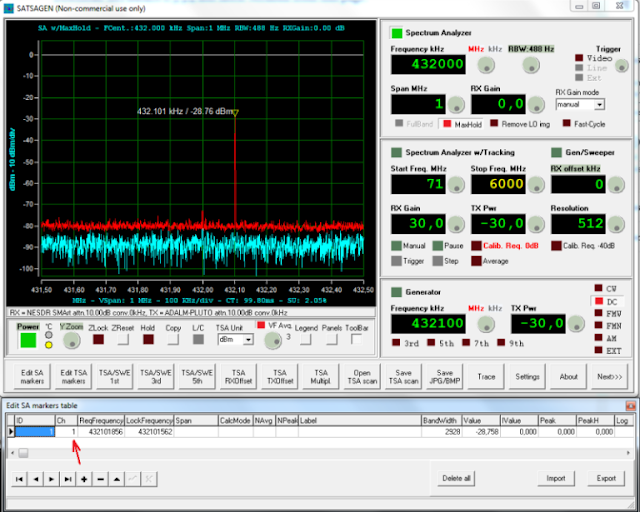
Website - Radio Frequence website and SATSAGEN Windows application that allows you to use an SDR device as a Spectrum Analyzer.

 Today I would like to share this website mainly for radio-amateur

On website you can find SATSAGEN software mention. Consider that it is a Windows application that allows you to use an SDR device as a Spectrum Analyzer. 

SATSAGEN is provided free of charge to the HAM Radio community, with the hope that SATSAGEN can be appreciated as a useful tool for our radio experimentation.

This is a latter post about SATSAGEN version 0.5.3.4

https://www.albfer.com/en/2021/04/27/satsagen-0-5-3-4/


Here it is software overview


SATSAGEN news:

Download SATSAGEN from this link:

There is a latter interesting video that give you a software overview


Multimedia - Easily Convert CD to MP3 with Album/track info, mp3 Cut, youtube to mp3/download and mp3 Tag Editor

During these days I was trying to rip different Audio CD to .mp3 format and automatically find track and album info.

At the same time I searched about mp3/Youtube tools that are below indicated.

All these software are freeware.

1. FreeRip CD to mp3 converter with Tracks and Album info.

http://www.freerip.com/

2. Fre:ac CD to mp3 converter with Tracks and Album info.

http://www.freac.org/

3. If you want to convert your videos/audio on line you can use the following link :

http://media.io/it/

4. mp3DirectCut It is an easy tool to cut mp3 music:

https://mp3directcut.it.uptodown.com/windows

5. Mp3 Tag editor :

http://www.mp3tag.de/en/

6. Free youtube to mp3 converter

http://www.dvdvideosoft.com/it/products/dvd/Free-YouTube-to-MP3-Converter.htm#.VkjUTvkveUk

7. Free youtube download:

http://www.dvdvideosoft.com/it/products/dvd/Free-YouTube-Download.htm#.VkjT8PkveUk

8. CD to MP3 Freeware

http://www.eusing.com/CDRipper/CDRipper.htm#.VkkCLfkveUk

[update 2015.12]

9. Youtube to mp3 on line website:

http://www.clipconverter.cc/it/

[update 2021.10.16]

10. MP4 to mp3 converter

Software - FastStone Capture #Screenshots tool

There is an interesting tool that works fine taking desktop screenshots (a.e. using keyboard combinations)

https://www.faststone.org/FSCaptureDetail.htm

Normally I utilize 5.3 version picking up only .exe file (taken after a software fresh installation).

Furthermore I am coping, previously .exe file, on any other pcs where screenshots are necessary to be taken.


FastStone Capture 5.3

http://www.oldversion.com/windows/faststone-capture-5-3

Here they are older versions links:

http://www.oldversion.com/windows/faststone-capture/

P.S. I knew this tool during my pharmaceutical working experiences and it was a nice discovery, indispensable for GMP Validations and any other importants IT activities


[update 2022-07-18]


I would like to highlight, that licensed software (20$) version permits to acquire/record audio/video easily (with good compression quality)

[update 2025-02-24]

Here they are alternative softwares

Network - Iperf tool & Speed test

During this time period I had necessity to stress and measure MPLS network connectivity without using internet connectivity available on line.

In this case speed test or any other internet web site tool was not useful.

Solution was using Iperf in command line mode launching a server session in remote site and a client session on another site.

In this way there was possibility to stress network and measure relative performances.

Here they are some video examples:

http://www.iperfwindows.com/screencasts.html

Meanwhile I am taking note about a good website dedicated to test internet performances.


[update 2022.08.31]

Tuning - Patch My PC

In previously years I used several tools to check no O.S. software updates.

Unfortunately FileHippo App Manager is no longer working fine as in the past.

So I found that Patch My Pc Updater is working excellently, user interface is not so easy but, after you configured properly it work very fine.

About Enterprise companies easily extend Microsoft Configuration Manager to deploy and patch an extensive list of third-party applications.

About SCCM here they are old blog articles

https://www.alessandromazzanti.com/search/label/SCCM%202012


Here it is lifewire article where are indicated similar software.

11 Best Free Software Updater Programs

https://www.lifewire.com/free-software-updater-programs-2625200

Application - Kubernetes overview and security concerns

Today I would like to take note on blog about Kubernetes technology, here is original producer link presentation

https://kubernetes.io/docs/concepts/overview/what-is-kubernetes/

Here it is a simple image


And here it is Attack matrix for Kubernetes provided by Microsoft:

https://www.microsoft.com/security/blog/2020/04/02/attack-matrix-kubernetes/

Software - Ultra VNC with acknowledgement

During these years I tested and configured Ultra VNC software version (UltraVNC_1_2_09) that permit you to connect to other client prompting for remote access, permissions grants and acknowledgement.

Consider that usually standard VNC installation permit you to connect to remote host with or without password 

End user is not aware that someone is viewing his desktop raising a big privacy issue.

https://www.uvnc.com/downloads/ultravnc.html


Tips/Antivirus - How to uninstall software on windows with problems #Sophos article

Here it is an interesting Sophos article that give you several tips and tools on how to force sophos Antivirus client removal. some of these tools can be used succesfully applied to all other software.

Here it is article:

https://support.home.sophos.com/hc/en-us/articles/115005679923-Unable-to-uninstall-Sophos-Home-Windows

Software - Flash Player & Adobe Reader Redistributable Direct Download Link

Here is Flash Player Redistributable Direct Download Link about Redistributable version:

https://www.adobe.com/products/flashplayer/distribution3.html


[update 2020.04.04]

About Adobe Reader Redistributable Direct Download link here it is:

https://get.adobe.com/reader/enterprise/


Freeware - Shrew Soft VPN Client

Today I would like to mention this free client VPN that is usable and working fine if you need to connect through VPN and having a .pcf file for that.

In my case I was seeking for an alternative Anyconnect client free software version.

https://www.shrew.net/download/vpn


There are Linux and Windows versions.

At the same time  Shrew Soft VPN Client for Windows is available in two different editions, Standard and Professional. 


  1. The Standard version provides a robust feature set that allows the user to connect to a wide range of open source and commercial gateways. It contains no trial period limits, nag screens or unrelated software bundles. It is simply free for both personal and commercial use
  2. The Professional edition offers additional features that may be helpful for users connecting to a corporate LAN. It is installed by default with a 14 day evaluation period limit. To use the Professional edition after the evaluation period has expired, a client license may be purchased from the Shrew Soft Shop.

Server - MAP Toolkit 9.8


Today I would like to mention the new MAP Toolkit version 9.8 availability.

This is a tool that helps organization:

  • Assess their environment.
  • To have software reporting status to generate usage report
  • Track usage (O.S. & Sw) and preparing a migration to Windows Azure virtual machines.
  • It helps increase the agility and cost effectiveness of deploying the latest Microsoft technologies
Here they are sw/o.s. that apply it:


  1. Exchange Server 2016.
  2. SharePoint Server 2016. 
  3. Windows 10 and previous versions
  4. Windows Server 2016 and previous versions.
  5. Office 2016, Office 365 and previous versions.
  6. It track usage of Windows Server 2012, SharePoint Server 2013, and Exchange Server 2013, 

Download and more details could be find here.

Here they are some screenshots:


HyperV/Vmware - How to convert .VHD file to .VMDK

If you only have a VHD file, and you want to convert it to VMDK format, WinImage (now at 9.0 version) can come to rescue. WinImage is a shareware but available for free evaluation use for up to 30 days. WinImage, which available in both 32-bit (x86) and 64-bit (x64) versions, is available for download from 


http://www.winimage.com/download.htm


The WinImage 8.50, 8.10, 8.00, 7.00 and 6.10 download contains the standard and professional editions of WinImage, as well as WinImage self-extractor.

I would like to highlight these old blog posts:

Vmware - Vmware Converter utility and consideration

HyperV - Microsoft Virtual Machine Converter 2.0

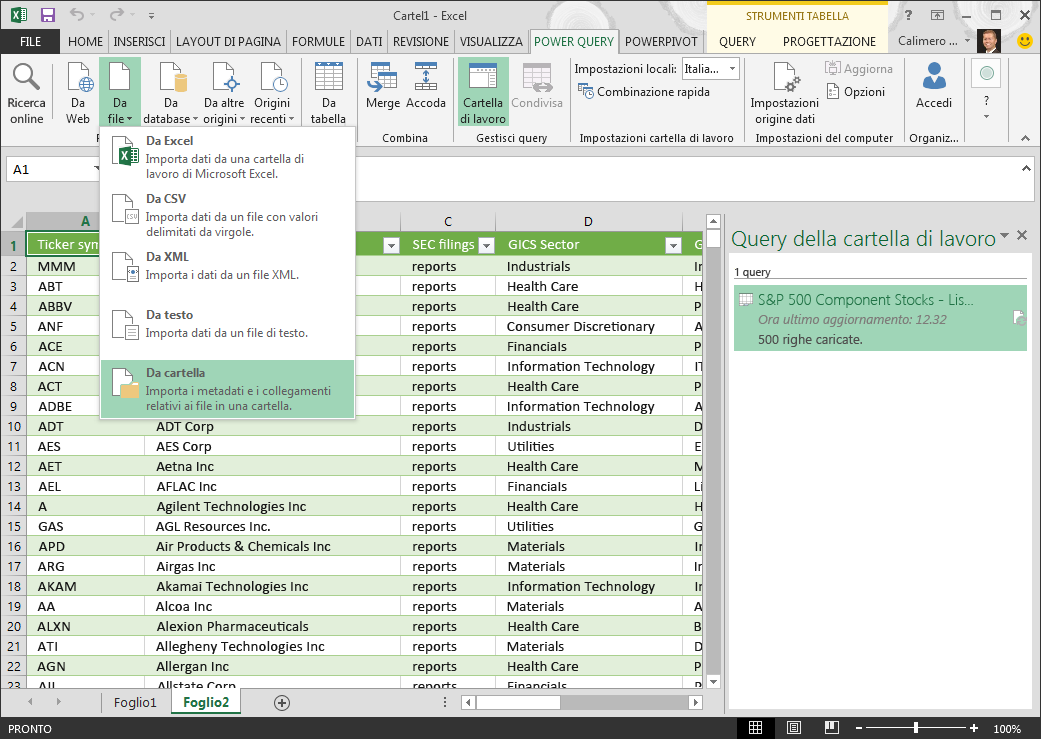
Microsoft Power Query for Excel

Microsoft Power Query for Excel is an Excel add-in that enhances the self-service Business Intelligence experience in Excel by simplifying data discovery, access and collaboration.

i would like to highlight this excel tool that i recently discovered

download:

https://www.microsoft.com/en-us/download/details.aspx?id=39379&CorrelationId=c2276676-6a86-4e6d-9722-be34ed96503e

Power Query enhances self-service business intelligence (BI) for Excel with an intuitive and consistent experience for discovering, combining, and refining data across a wide variety of sources including relational, structured and semi-structured, OData, Web, Hadoop, and more.

If you want to go deeper with this tool you can review these articles:

https://www.excelcampus.com/powerquery/power-query-overview/

Power Query italian & English Guide

https://support.office.com/it-it/article/Guida-di-Microsoft-Power-Query-per-Excel-2b433a85-ddfb-420b-9cda-fe0e60b82a94?CorrelationId=44f59a8b-1551-4bc2-86e5-59f17fd0cf64&ui=it-IT&rs=it-IT&ad=IT

https://support.office.com/en-us/article/Introduction-to-Microsoft-Power-Query-for-Excel-6E92E2F4-2079-4E1F-BAD5-89F6269CD605

Power Query M function reference

https://msdn.microsoft.com/library/1ed840b1-7e20-4419-ad2f-d82054c9b2ab

Power Query M Reference

https://msdn.microsoft.com/en-us/library/mt211003.aspx

Introduzione

Hacker - Ransomware CryptON decryptor tools

Here they are some decrypter tools about CryptON ramsomware.

1.) Emisoft tool can be directely downloaded from this link

https://decrypter.emsisoft.com/download/crypton

Step by step procedure can be found here.

https://www.bleepingcomputer.com/news/security/emsisoft-releases-a-decryptor-for-the-crypton-ransomware/

In any case you should drag and drop encrypted files to .exe tool.

After that you will find decryting key (after a while)

Once finished you will prompted about license acceptance windows and then for adding files/folder that you have decrypting necessity.

2.) Kaspersky decrypter

http://media.kaspersky.com/utilities/VirusUtilities/EN/rakhnidecryptor.zip

3.) Eset decrypter

https://download.eset.com/com/eset/tools/decryptors/crysis/latest/esetcrysisdecryptor.exe

Tool - MD5 calculation

Here they are some tools that permit to calculate MD5:

1. Fastsum: http://www.fastsum.com/

2. WinMD5Free: http://www.winmd5.com/

3. If you need to calculate CRC you can use this Microsoft tool  (FCIV)


Here is a syntax example but you could obviously use a different syntax


Get-ChildItem C:\Scripts, C:\Test, "C:\Documents and Settings\Kenmyer\Desktop" -filter "*.ps1"

If you like to go deeper on MD5 theory you can review wikipedia article:


The MD5 algorithm is a widely used hash function producing a 128-bit hash value. Although MD5 was initially designed to be used as a cryptographic hash function, it has been found to suffer from extensive vulnerabilities. It can still be used as a checksum to verify data integrity, but only against unintentional corruption.
Like most hash functions, MD5 is neither encryption nor encoding. It can be cracked by brute-force attack and suffers from extensive vulnerabilities as detailed in the security section below.
MD5 was designed by Ronald Rivest in 1991 to replace an earlier hash function MD4.[3] The source code in RFC 1321 contains a "by attribution" RSA license. The acronym "MD" stands for "Message Digest."

The security of the MD5 has been severely compromised, with its weaknesses having been exploited in the field, most infamously by the Flame malware in 2012. The CMU Software Engineering Institute considers MD5 essentially "cryptographically broken and unsuitable for further use".[4]
https://en.wikipedia.org/wiki/MD5

[update 2016.04.09]

Here it is a free tool about MD5 Calculation:


Hacker - Truecrypt alternatives

You should be aware that TrueCrypt development was no longer maintained/updated  since 2014.

http://www.alessandromazzanti.com/2013/08/usb-create-usb-encrypted-with-truecrypt.html

Several security bugs have been not resolved.

You fan review this article about some alternatives that I summarize them in this article too.

https://www.comparitech.com/blog/information-security/truecrypt-is-discoutinued-try-these-free-alternatives/,.


Here they are Truecrypt alternatives (from my side I use, normally, 2. and 7. options):
  1. VeraCrypt You can find a full list of improvements and corrections that VeraCrypt made on TrueCrypt here. It is open source and free.
  2. Bitlocker no encrypted containers ability and not open source.
  3. DiskCryptor supports encryption of external devices including hard drives, USB drives, CDs, and DVDs
  4. CipherShed
  5. FileVault 2 Apple’s answer to Bitlocker, no encrypted containers ability and not open source.
  6. LUKS
  7. SafeHouse Explorer – 3.01 Portable
About other blog articles about bitlocker you can review this link: