Esiste una versione di putty con i tab, si chiama PuttyCM, è gratis e lo si scarica da qui:
PuttyCM download
Il vantaggio è di aprire tantissime sessioni putty facilmente visualizzabili tramite un'unica finiestra con i relativi tabs.
Di seguito un articolo che elenca la storia e i software putty like.
http://www.whoishostingthis.com/resources/ssh-putty/
----
There is an interesting putty version that has tabs features.
PuttyCM is free and can be downloaded from here.
PuttyCM download
The biggest advantage is that you can open a lot of putty sessions on a single window.
Here is an interesting article that well explain software history and relatives alternatives.
http://www.whoishostingthis.com/resources/ssh-putty/
Recovery - Free tools to find Bad sectors and mark them
Here they are some tools that search about errors and meanwhile they mark sectors that are bad.
First step is utilizing chkdsk /A /R /F command.
Partition Master Free 10.8
http://www.partition-tool.com/personal.htm
Download
CheckDrive 2016
http://www.easeus.com/partition-manager/epm-free.html
Download
First step is utilizing chkdsk /A /R /F command.
Partition Master Free 10.8
http://www.partition-tool.com/personal.htm
Download
CheckDrive 2016
http://www.easeus.com/partition-manager/epm-free.html
Download


Monitoring - VirtualWin with Autoswitcher plugin
There is a very useful software that help to switch from a virtual desktop to another.
This software is VirtualWin with Autoswitcher plugin:
Here they are other plugins that could be useful:
http://virtuawin.sourceforge.net/modules.php
You must consider to copy modules here:
C:\Program Files (x86)\VirtuaWin\modules
You should implement a monitoring solution in this way:
1. Install your monitoring software on a VM or phisical pc with large monitor.
2. Install Ultravnc, Teamviewer, Vmware ESX client with precedent tools...
3. Install on that pc monitoring tools that you like (Veeam One, Opmanager, Nagious...)
4. Install Virtual Win with Autoswitcher feature
5. You will have a single monitoring place where your IT guys can view or connect to verify your infrastructure status.
Here they is blog monitoring section:
http://www.alessandromazzanti.com/search/label/Monitoring
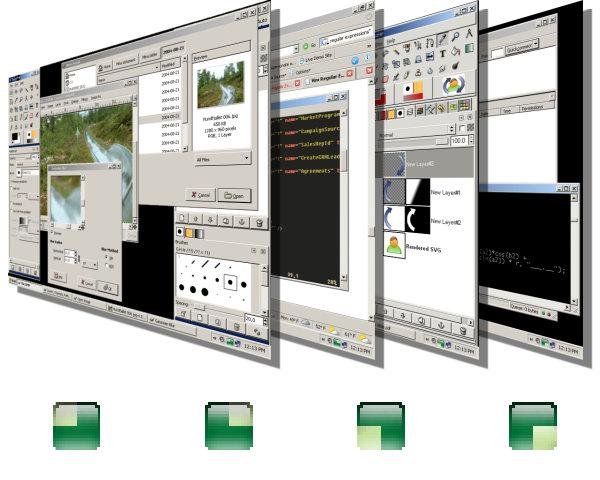
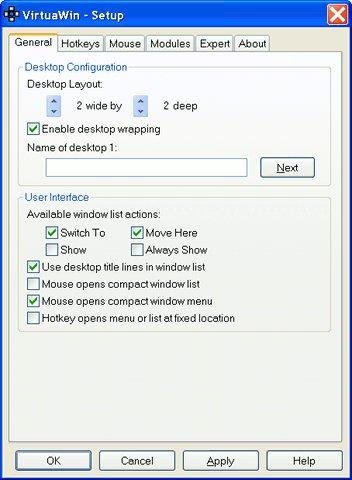
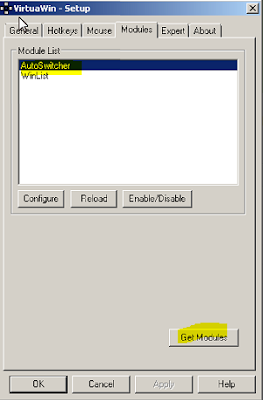
[update 2023.08.01]
This software is VirtualWin with Autoswitcher plugin:
Here they are other plugins that could be useful:
http://virtuawin.sourceforge.net/modules.php
You must consider to copy modules here:
C:\Program Files (x86)\VirtuaWin\modules
You should implement a monitoring solution in this way:
1. Install your monitoring software on a VM or phisical pc with large monitor.
2. Install Ultravnc, Teamviewer, Vmware ESX client with precedent tools...
3. Install on that pc monitoring tools that you like (Veeam One, Opmanager, Nagious...)
4. Install Virtual Win with Autoswitcher feature
5. You will have a single monitoring place where your IT guys can view or connect to verify your infrastructure status.
Here they is blog monitoring section:
http://www.alessandromazzanti.com/search/label/Monitoring

[update 2023.08.01]
To automatically update web page, on edge browser, after a minimal amount of seconds this is correct addon
Toshiba - Post Warrany
Here is post purchase warranty support from toshiba that I utilize about Toshiba products in Italy:
http://www.toshiba.it/innovation/generic/ASS_POPS/
Qui si trova il servizio post vendita di Toshiba che utilizzo per i prodotti Toshiba in Italia.
http://www.toshiba.it/innovation/generic/ASS_POPS/
http://www.toshiba.it/innovation/generic/ASS_POPS/
Qui si trova il servizio post vendita di Toshiba che utilizzo per i prodotti Toshiba in Italia.
http://www.toshiba.it/innovation/generic/ASS_POPS/
Exchange 2003 - Fixing “backOfficeStorage” MBX is not accessible Error When Opening OWA Folders
If you got, on Exchange Server this error:
“backOfficeStorage” MBX is not accessible Error When Opening OWA Folders

I succesfully solved appling this procedure:
https://ittutorials.net/fixing-backofficestorage-mbx-is-not-accessible-error-when-opening-owa-folders
“backOfficeStorage” MBX is not accessible Error When Opening OWA Folders
I succesfully solved appling this procedure:
https://ittutorials.net/fixing-backofficestorage-mbx-is-not-accessible-error-when-opening-owa-folders
Server - How to Pass proxy.pac script to client with DHCP
If your company has proxy to browse internally and externally thought internet your problem would be to publish automatically that to clients.
There are several ways to deploy proxy to client's browser like Wpad, GPO, login script...
One that I would like to focuse is DHCP with option 252 that will pass to clients a proxy.pac script that, depending on which subnet client is, will setting up a differently proxy to clients.
proxy.pac can be published in several ways:
There are several ways to deploy proxy to client's browser like Wpad, GPO, login script...
One that I would like to focuse is DHCP with option 252 that will pass to clients a proxy.pac script that, depending on which subnet client is, will setting up a differently proxy to clients.
proxy.pac can be published in several ways:
- Distribute the tested
proxy.pacfile either by emailing it to your users or by posting it on an internal web server. - Distribute the configuration as a
wpad.datfile, which is documented in the Publishing Proxy Information as awpad.datFile Knowledgebase article. - Enforce the proxy configuration by Creating a Group Policy Object (GPO) on your Active Directory server.
Here they are some articles useful:
Subscribe to:
Posts (Atom)