University - 24/04/2002 -24/04/2022 #personal special anniversary date

I have always found several difficulties publishing, on internet, or on social media, personal information and photos (if not in pediatric quantities).

But, today an exception is necessary, in fact, exactly 20 years ago, I got IT Engineer bachelor degree (five-year).

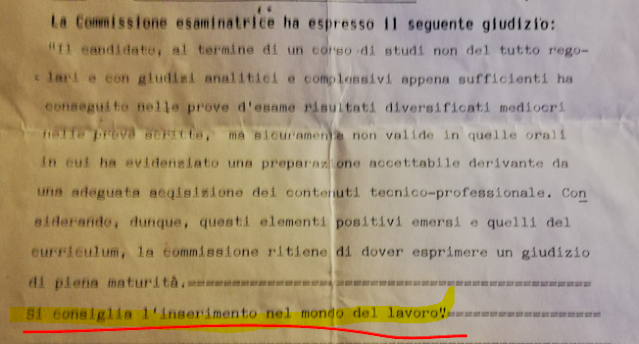
I finished high school having several difficulties and, the admission judgment ( exam state), was deserved (in negative sense). Among other things, my inclusion (Work world ) was strongly suggested.

I was really problematic (during high school time period)

I finished high school, using tooth and nails, due to fact I had presentiment that University was my way/destiny (the doubt was which one)

The computer science professor was decisive in choosing the university who, in addition to being a father's friend, welcomed us, into his office, telling us about engineer and his University experience.

After this meeting my, university roadmap, was clear in front of me.

Many thanks to IT professor, my parents who supported me financially (and in particular my father who, even he did not speak so much, always trusted in me), several sacrifices that I made (even more necessary, more than other students, due to the fact that I had studied almost nothing on high school) and, why not, a bit of luck (which, in life, it is always useful).

Due to reasons, indicated at the beginning, I do not publish degree day photos but, I like to mention, what "the great" Mathematical Analysis's professor Massimo Furi usually said:

"... There are no differences between a freshman who enters the university and an engineer, the freshman does not know anything for obvious reasons. Those who have just graduated no longer remember anything about what they have studied. But graduated persons has changed their mind/"formas mentis" ... "

and, I feel to add: graduated guys has, surely, two more gears (like mental plasticity)

I end up saying "IT Engineer Bachelor Degree was one, of the 'Missions impossible', that I successfully achieved"

.... latter things, here it is, friends of mine endorsement with whom we studied various exams... He mentioned, some aspects, that rarely are noticed by almost persons.


<=============>

Trovo, da sempre, grande difficolta' nel pubblicare su internet, o sui social, informazioni e foto personali (se non in quantita' pediatrica).

In questa giornata e' doveroso fare una, piccola, eccezione.

Oggi, vent'anni fa esatti, mi laureavo:

Terminai le superiori con grossa difficolta', ed il giudizio di ammissione all'esame di stato (APPENDICE --> GIUDIZIO AMMISSIONE ESAME SUPERIORI), era meritato (in senso negativo). Tra l'altro si caldeggiava il mio inserimento nel mondo del lavoro (APPENDICE --> ESITO ESAMI SUPERIORI)

Ero, effettivamente, molto problematico (durante il periodo delle superiori)

Terminai le superiori, con le unghie e con i denti, perche' dentro me avevo il presentimento che la mia strada era di fare l'universita' (il dubbio era su quale)

Fu determinante, nella scelta dell'ateneo, l'allora professore d'informatica che, oltre ad essere amico di mio padre, ci accolse, nel suo ufficio per raccontarci di Ingegneria e della sua esperienza (essendo lui Ingegnere).

Dopo questo incontro ne rimasi folgorato ed ero oramai certo di quello che avrei voluto fare da grande.

Devo ringraziare tantissimo il professore di Informatica, i miei genitori che mi hanno sostenuto economicamente (ed in particolare mio padre che, anche se era di poche parole, ha sempre creduto in me), i tantissimi sacrifici da me fatti (ancor piu' necessari, piu' di altri studenti, per il fatto che avevo, alle superiori, studiato quasi niente) e, perche' no, un pizzico di fortuna (che nella vita serve sempre).

Non metto foto della laurea per i motivi indicati all'inizio ma indico quello che disse il "grande" professore di Analisi Matematica I e II Massimo Furi:

"...Non vi e' differenza tra una matricola che entra all'universita' e un ingegnere, la matricola non sa nulla per ovvi motivi. Chi si e' appena laureato non ricorda piu' niente di quello che ha studiato. Ma la persona laureata ha cambiato "formas mentis" ..."

ed aggiungo, ha due marce in piu' (come plasticita' mentale)

Finisco dicendo "IT Engineer Bachelor Degree was one, of the 'Missions impossibles', that I successfully achieved"

....dimenticavo, aggiungo l'endorsement di un mio amico con il quale abbiamo fatto vari esami insieme e, se non ricordo male, ci siamo laureati a pochi mesi di distanza... Ha centrato aspetti che ai piu' sfuggono, o sono sfuggiti, sul mio conto...


APPENDICE

GIUDIZIO AMMISSIONE ESAME SUPERIORI


ESITO ESAMI SUPERIORI


Server - Microsoft DTC & Firewall rules

Here it is official Microsoft article that explain on how correctly configure Distributed Transaction Coordinator (DTC) working properly through firewall (and relatives ports to be opened):

https://support.microsoft.com/en-us/topic/c3ccb2af-a9f8-180e-8e11-8565f6c654a2#:~:text=All%20ports%20must%20be%20in,of%2015%20to%2020%20ports


Network - Wireshark Tutorials

Here they are HowToForge tutorials related to Wireshark.

I am taking note on blog and share it in case for someone might be useful.

Overview of the Wireshark User Interface (GUI)

https://www.howtoforge.com/overview-of-wireshark-user-interface-gui/

How to use Wireshark for capturing and analyzing network packets

https://www.howtoforge.com/how-to-use-wireshark-for-capturing-and-analysing-packets/

Wireshark Remote Capturing

https://www.howtoforge.com/wireshark-remote-capturing


Tips - How to fix “The sign-in method you’re trying to use isn’t allowed”

If you have necessity to logon to Domain Controller without having Domain Admins permissions you should  change Default Domain Policy checking if you users belongs to "Deny log on locally" section 

Computer Configuration > Policies > Windows Settings > Security Settings > Local Policies > User Rights Assignments

Here it is original article

https://www.top-password.com/blog/fix-the-sign-in-method-youre-trying-to-use-isnt-allowed/

SCRIPTING - HOW TO SCHEDULE SERVER REBOOT

If you need to plan one shot (fixed time and date) reboot you could use this command.

It will create a scheduled task, that can be executed with or without any one logged on.

(no password saving is required)

Obviously any other customization is easily to be rearranged.

schtasks /create /sc once /tn taskname /tr "shutdown -r -f” /st hh:mm /sd dd/mm/yyyy /NP


/NP   No password is stored.  The task runs non-interactively

            as the given user.  Only local resources are available.      

 /SC   schedule    Specifies the schedule frequency.

                                    Valid schedule types: MINUTE, HOURLY, DAILY, WEEKLY,

                                    MONTHLY, ONCE, ONSTART, ONLOGON, ONIDLE,                                     ONEVENT.                                                          


/SD   startdate    Specifies the first date on which the task runs. The

                                   format is dd/mm/yyyy. Defaults to the current

                                    date. This is not applicable for schedule types: ONCE,

                                    ONSTART, ONLOGON, ONIDLE, ONEVENT.                           


/ST   starttime     Specifies the start time to run the task. The time

                                    format is HH:mm (24 hour time) for example, 14:30 for

                                    2:30 PM. Defaults to current time if /ST is not

                                    specified.  This option is required with /SC ONCE.


/TN   taskname    Specifies the string in the form of path\name

                                    which uniquely identifies this scheduled task.


/TR   taskrun      Specifies the path and file name of the program to be

                                    run at the scheduled time.

                                    Example: C:\windows\system32\calc.exe            

[UPDATE 2023.08.08]

Windows 2003/2008/2008 R2/2012/2012 R2 this is correct syntax.

schtasks /create /sc once /tn taskname /st hh:mm /sd dd/mm/yyyy /NP /tr "shutdown -r -f”

schtasks /create /sc once /tn "Server Reboot" /st 19:00 /sd 19/05/2025 /NP /tr "shutdown -r -f”


SCRIPTING - HOW TO CHECK SERVER UPTIME WITH SINGLE COMMAND

If you must check server uptime (or any other information) systeminfo is an interesting command line tool (Windows builtin)

SystemInfo /s SERVERNAME| find "Boot Time:"

With previous command you could obtain remote server uptime information

Indeed concatenating previous commands, using &&, it will aggregate several server info "one shot"

SystemInfo /s SERVERNAME1 | find "Boot Time:" && SystemInfo /s SERVERNAME2| find "Boot Time:"

Consider that you might launch command line, locally, with AD account with enough permissions on remote servers.

[related article]

Scripting - How to refresh remote client ip

[Update - 2022.11.17]

There is an alternative way to check, remotely, system uptime, it is using psexec in conjunction with wmic command.

About psexec you can review this old blog article:

https://www.alessandromazzanti.com/2014/04/psexec-21-download-and-tutorials.html

  1. execute cmd with Administrative rights
  2. cd c:\patchwherepsexecislocated\
  3. PsExec64.exe \\REMOTEPCNAME cmd
  4. wmic path Win32_OperatingSystem get LastBootUpTime